
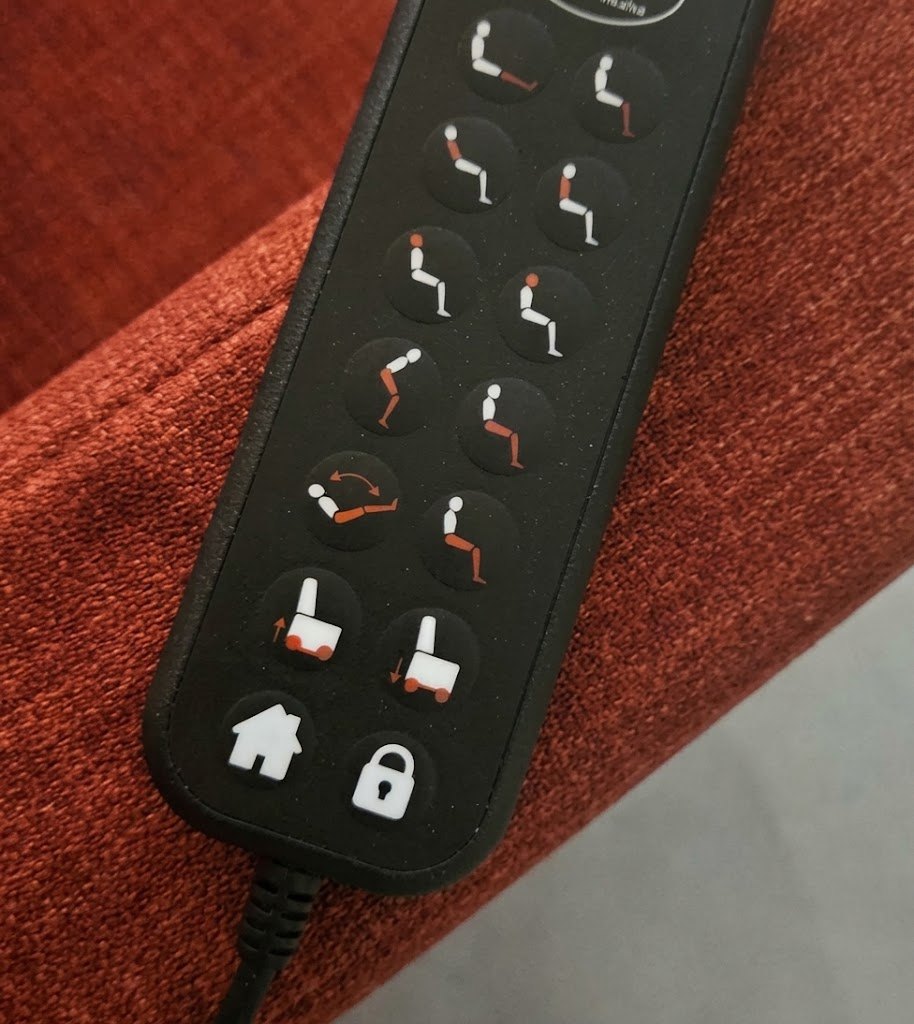
When hands are weak or painful, using a riser recliner also means being able to reach the handset, recognise the desired movement and activate it with a comfortable action. Sollevita’s wired handset organises controls in pairs and uses symbols depicting the person’s positions and the chair’s movements. The Home and lock buttons are at the bottom, identified by house and padlock symbols.
In brief
The Home button returns Sollevita to its closed, seated position; the padlock button enables and disables the control lock. Choosing a handset also involves considering how the person picks it up, uses it and puts it down. Sollevita offers wired and wireless handsets, to be chosen with the Team according to the person’s needs and the configuration.
Home and lock on the wired handset
Pressing Home, identified by the house symbol, returns the chair to its closed, seated position. It is the control to know for bringing the chair back to sitting after using the adjustments.
The lock is enabled and disabled using the same dedicated padlock button. This function is designed to prevent unintended operation of the controls while the lock is engaged. During the explanation, it is useful to demonstrate both how to lock the handset and how to unlock it to resume adjustments.
These instructions refer to the wired handset described here. During the consultation, always relate the explanation to the version of the handset that will be supplied, particularly when considering the wireless option.
Describe the actual difficulty before choosing controls
“They have little strength in their hands” can describe different situations. Does the person drop the handset? Can they hold it, but pressing a button hurts? Do they struggle to distinguish the symbols? Or does the problem occur only when the arm has no support? Describing the difficult action is more useful than immediately attributing everything to age or to the same diagnosis.
Start with the hand the person can actually use, which is not necessarily their dominant hand. Ask where they prefer to find the handset and which movements feel most natural. The person assisting can add observations, but should not take over throughout the trial.
The Swiss League Against Rheumatism highlights the importance of reducing unnecessary gripping effort and adapting activities to the hands. When trying the handset, it is therefore useful to observe how firmly it needs to be held, how the arm is supported and what help is needed. [1]
When the problem is associated with osteoarthritis, the context of sitting, standing up and painful hands can be explored on the dedicated page. Hand weakness, however, should not automatically be equated with osteoarthritis.
1. Pick up the handset without a tiring grip
Place the handset where it will normally be kept, using the setup already agreed for the trial. Observe whether the person can reach it without leaning out of the seat and lift it without gripping more firmly than necessary. A device that is easy to use when placed in the hand may be difficult to retrieve from a side table.
Consider its shape, surface and resting place. Does the handset slip, turn or require both hands to keep it steady? Using two hands is not in itself a mistake if this is comfortable and genuinely possible. What matters is that it does not make control impossible when the person is alone.
Do not add improvised covers or fastenings to get around an unsuccessful trial. Team Sollevita can check which solutions are compatible with the supplied handset; an occupational therapist can assess how to adapt the action to the person’s abilities.
2. Orient the handset and recognise the movement
Ask the person to identify which way up the handset goes and the functions they will use most often. The useful question is not only “Can they see the button?” but “Do they understand which part of the chair will move?” Eyesight, lighting and familiarity with the symbols can affect ease of use.
On Sollevita’s wired handset, the buttons are arranged in two columns and organised in pairs. The pictograms help relate each control to the person’s position or the chair’s movement. The explanation can start with the most frequently used adjustments, showing the button and corresponding movement each time. Other functions can be introduced gradually.
A visual guide near the chair can serve as a reminder of the actual controls, without covering the original labels. It must refer to the supplied handset: do not use drawings of a different model or show a dedicated stop button if the system does not have one.
3. Press without turning the trial into a strength exercise
The person should be able to operate the button with an action they can tolerate in their usual position. Observe whether they tense the whole arm, press the handset against their body or repeatedly look for a support point to do so. There is no need to measure finger strength to describe these difficulties.
Try only appropriate movements, explained before they start and carried out according to the instructions. If pain occurs, stop the check: do not ask for more presses to see whether “a little practice” will make the handset easier to use.
Adapting a grip is different from making an electrical modification. Occupational therapy can help assess activities, supports and assistive devices, as the Swiss League Against Rheumatism also describes in relation to thumb-base osteoarthritis. Any solutions applied to the handset must still be compatible with the product. [2]
4. Control the movement and return to sitting
During the explanation of the controls, check how to start and stop each movement according to the instructions for the supplied handset. For hold-to-run adjustments, releasing the button is part of controlling the movement. Also demonstrate the return to sitting with Home so that the person understands what this control does and knows when to use it.
Observe whether the finger can release the button easily and whether the handset remains steady. A button that is easy to activate may be difficult to manage if the handset slips or the hand tires. This information should be shared before the person is left to operate the adjustments without support.
Do not use tape, objects or accessories to hold a button down to overcome a hand difficulty. Do not continue a trial if a movement is unexpected or does not respond as it should. This calls for technical support rather than a different gripping strategy.
5. Support the forearm as well as the handset
Even a light handset can become tiring to use when the whole arm is unsupported. Check forearm support and the distance between the handset and the body in the person’s usual seated position. The hand does not work in isolation: the positions of the pelvis, back and shoulder affect the action.
The Swiss League Against Rheumatism also emphasises the value of comfortable wrist alignment during activities. This does not mean imposing the same rigid position on everyone, but avoiding a situation where using the handset requires the wrist to be held at an uncomfortable angle for a long time. [1]
Removable armrests should therefore not automatically be taken off simply because the product allows it. The complete armrest may provide the support needed while using the handset; the removable upper section addresses the need to move closer to a table. The configuration should be chosen for the action the person is performing. [3]
6. Find the handset again after reclining
A convenient place for the handset while sitting may become less convenient when the backrest reclines. Check reach in the positions actually used and when returning. The handset should not end up behind the person’s side or out of reach when they relax their arm.
Do not drop the handset to test whether the person can retrieve it. Simply observe where it is placed and what changes during the permitted adjustments. If it is out of reach, the person assisting should retrieve it: leaning beyond the available support or pulling the cable should not become the usual solution.
If you use the wired version, agree cable positioning with Team Sollevita. It needs to remain free from crushing, tension and interference with removable components or mechanisms. Put the handset in the agreed resting place; avoid retrieving it by pulling the cable or wrapping the cable around the body.
7. Repeat the sequence without relying on a single moment
One successful demonstration does not necessarily reflect the whole day. When the person is willing and the situation allows, check only the priority functions again after a break or at another usual time. Do not set a compulsory duration or cause fatigue in order to obtain a result.
Note whether the need for help changes: someone may need to hand over the handset, read a symbol or manage a movement. These are three different needs. Support may be limited to one part of the sequence, preserving the actions the person can manage comfortably.
Also agree how to ask for help if the handset is unavailable or the hand is more painful. An accessible solution includes both what the person can do independently and the assistance actually available, without relying on someone who “usually happens to be passing”.
The seven-check record
Use this table to describe what happens, not to score the person. An unsuccessful outcome is not a performance to improve at any cost: it provides information for changing supports, arrangements or the way the controls are used.
| CHECK | PRACTICAL QUESTION | USEFUL NOTE |
|---|---|---|
| Pick up | Can the handset be reached from its usual place? | Position, hand used and help needed |
| Orient | Is it clear which movement the button activates? | Difficult symbols or lighting to improve |
| Press | Is the action tolerable and controllable? | Pain, slipping or a tiring grip |
| Control movement | Are the intended stopping method and return with Home understood? | Releasing the button and using the return control |
| Support | Is the forearm supported? | Armrest, shoulder position and wrist position |
| Find again | Does the handset remain accessible in the positions used? | Resting place and cable, if present |
| Repeat | Does the sequence remain clear in the daily routine? | Time of day, tiredness and support required |
Controls and seating to consider on Sollevita
Sollevita has 5 to 8 independent motors, depending on weight capacity. This allows separate adjustments, but the number of functions alone does not establish how accessible the handset is. Trying the controls and being able to manage the movements that are actually useful come first. [3]
The 52 or 63 cm seat width and the three available depths should be chosen in relation to the person’s body. An unsuitable size may lead to repeatedly searching for support or using the arms to reposition. The powered Push Head headrest is integrated as standard and adjusts head and neck support separately from the main backrest, including for watching TV, reading or working at a computer. This adjustment should be considered alongside arm support and the position of the screen or book. [3]
Wired and wireless handsets are available for Sollevita. The choice is agreed with the Team according to the person’s needs and the chair’s configuration. Describe which hand you will use, where you will put the handset and whether the person assisting will also operate the adjustments. This information helps assess the solution and organise a useful trial.
The chair’s lithium battery powers the motors; the type of handset is a separate choice. Ask for the handset supplied and its instructions to be identified in the agreed configuration, so that the explanation and trial refer to the device you will use.
When more than a handset trial is needed
Persistent pain or a change in the ability to use the hand should be discussed with a healthcare professional, not only with technical support. An occupational therapy assessment may help with supports and ways of using the handset. Difficulty with a control does not, on its own, identify the cause.
Sudden loss of strength, especially on one side, sudden difficulty speaking or a change in the face requires urgent help: call the local emergency number, 112 in the European Union. Do not wait for advice about the chair. France’s Assurance Maladie lists these signs among possible stroke symptoms. [4]
If the difficulty instead involves a stuck button, a damaged cable or movement that has not been commanded, stop using the chair and contact support. A video call and the correct spare part may help, but you do not need to open the handset, motors or control unit. Sollevita’s technical support arrangements provide a reference for this process.
FAQ
Common questions
How should I choose a riser recliner if my hands are weak?
Try the handset with the hand you will actually use and in your usual posture. Check grip, button recognition, pressing, releasing and retrieval. Another person demonstrating ease of use does not replace this observation.
Can the handset be used with one hand?
This may be possible if its shape, position and operation allow it. Stopping and returning also need to be checked, not just starting a movement. Any adaptations must be compatible.
Can I stop the chair simply by releasing the button?
For hold-to-run adjustments, releasing the button is part of controlling the movement. Ask to be shown how each control on the supplied handset behaves and follow its instructions. The Home button returns the chair to the seated position.
Does the battery make the handset wireless?
No. The chair’s lithium battery powers the motors. Sollevita offers wired and wireless handsets: the Team helps you choose according to the person’s needs and the configuration. During the trial, check that the chosen handset remains within reach and usable in the usual positions.
Do more motors make the product too complicated?
Not automatically. Independent adjustments can be introduced activity by activity, starting with those needed. The choice depends on understanding and access to the controls, not the number alone.
What should I send before the consultation?
Describe which action is difficult, the hand used, where the handset is placed and whether help is needed. Add the person’s measurements and those of their current seat. Do not cause pain or repeat difficult movements to make a video.
What is the Home button for?
On the wired handset described in this article, pressing the button with the house symbol returns the chair to its closed, seated position.
How do I enable and disable the control lock?
The lock is enabled and disabled using the dedicated button with the padlock symbol. It is designed to prevent unintended operation of the controls while engaged.
Sources and references
[1] Swiss League Against Rheumatism · Switzerland. Tips for protecting your hands.
[2] Swiss League Against Rheumatism · Switzerland. Occupational therapy and thumb-base osteoarthritis.
[3] Sollevita · La Castellana. Sollevita riser recliner chair with care features.
[4] Assurance Maladie · France. AVC et AIT : symptômes, diagnostic et évolution.
The healthcare sources support the principles cited, not a recommendation of Sollevita. Product specifications are information supplied by the manufacturer; the practical records are editorial tools, not clinical tests.
Discuss your everyday sequence with the Team
Buying Sollevita from a distance begins with a consultation with the Team. Describe daily activities, the hand used and the actions that are difficult: this information helps assess whether the chair is suitable and how to personalise it. Bring your observations from the seven checks to the discussion of the care riser recliner chair’s controls and adjustments, to choose a way of using it that is practical for your everyday life.