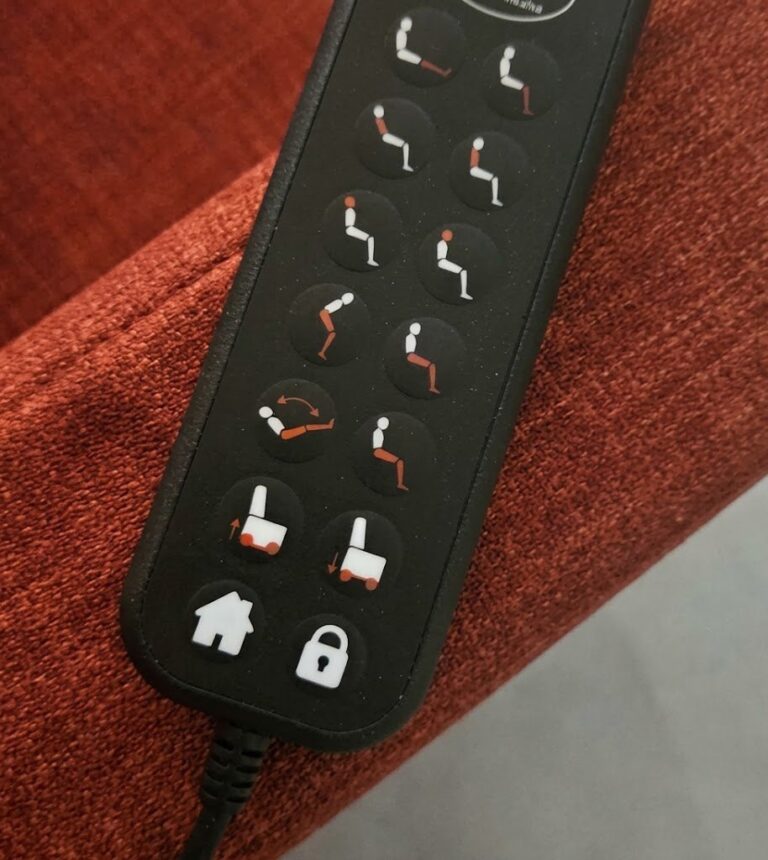
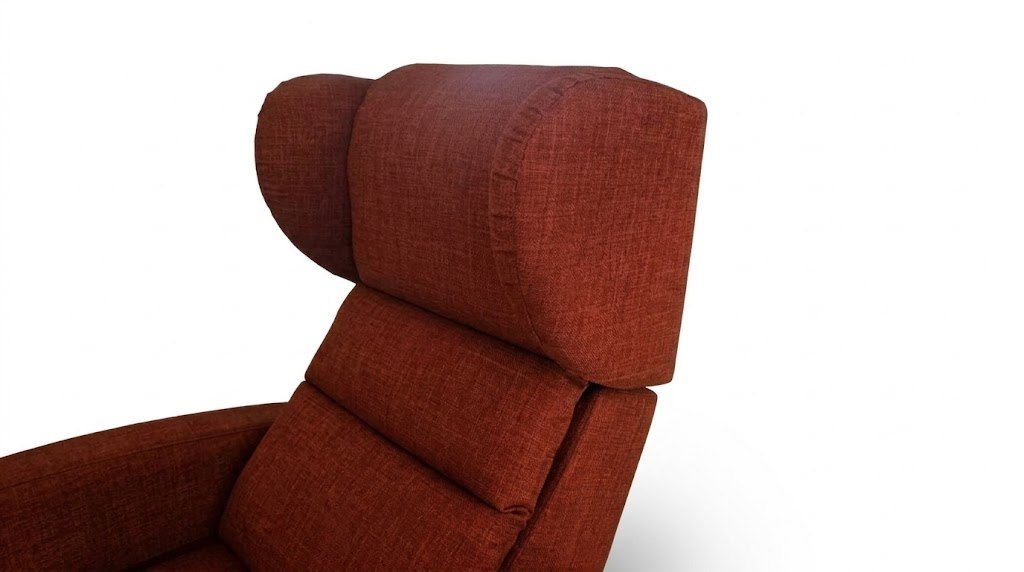
Watching television, reading a book and working at a computer involve different support needs. The direction of your gaze, arm position and preferred backrest angle change. Push Head allows head and neck support to be adjusted using the handset to accommodate these changes. [1]
On Sollevita, the powered headrest is integrated into the high backrest as standard. It is a feature worth understanding both for people seeking comfort during their activities and for those who need assistance or specific supports. The consultation with the Team starts with the person and their day, to assess the chair’s suitability and define its configuration.
How Push Head works
Push Head adjusts support at the top of the backrest. Its adjustment is separate from that of the main backrest, which changes the angle of the trunk relative to the seat. This allows you to find a different head support position even after settling on a comfortable position for your back. [1]
Vertical height adjustment changes the height of the whole chair. Understanding the purpose of the different Sollevita functions helps you identify which adjustment to use. During a demonstration, you can ask to see the Push Head movement separately, with a side view showing the part concerned and the control being used.
The integrated adjustment may reduce the need to reposition a comfort cushion. If you use a prescribed support, include it in the assessment: its use depends on the needs for which it was selected.
The seat and other supports
Before adjusting the headrest, observe how your pelvis and back are supported. If you remain too far forward on the seat or have to shift your body to reach the backrest, tell Team Sollevita. Seat depth and arm support should be considered alongside head comfort.
Resources from Swiss Paraplegic Research describe the relationship between the pelvis, spine and head orientation when seated in a wheelchair. This reference helps explain why it is useful to consider all the supports together when discussing the chair too. [2]
Sollevita offers seat widths of 52 or 63 cm and three seat depths. These dimensions are assessed in relation to the person’s proportions and everyday use. A well-proportioned seat makes it possible to assess the headrest in the position in which it will actually be used. [1]
Six activities for assessing Push Head
Choose the activities below that form part of your day. For each one, consider the support you would like, the objects you use and whether you can reach the handset.
1 Watching television
When the backrest reclines, the direction of your gaze also changes. Push Head allows the upper support to be adapted to the position you choose for watching TV. Observe whether you can see the screen comfortably while maintaining head support that feels right for you.
Consider where your television is actually placed: its height, distance and position in relation to the chair. Bring these details to the consultation. An adjustment demonstrated in front of a different screen may need adapting in your own room.
2 Reading a book or using a tablet
A book on your lap and a tablet on a stand may call for different support. Consider where the text is, how you support your forearms and which backrest angle you prefer. Then adapt the headrest to the comfort you are looking for while reading.
When a trial is possible, use your own book or device. Notice the small steps too: turning a page, retrieving the handset and taking a break. If you repeatedly have to move several objects, simplifying the arrangement may help.
3 Working at a computer
When using a computer, screen position needs to be considered alongside the keyboard, mouse and arm support. You may find one setting comfortable for watching a video and need another while typing or using the mouse. Push Head allows head support to be adapted to the chosen activity.
Before assessing the adjustment, describe your computer and intended workstation to the Team. If you work at a table, check how the chair approaches it and whether you can reach the equipment. Head support should form part of a workstation that is usable as a whole. Consider how you will move from working to taking a break and where you will put the handset.
4 Taking a break in Zero Gravity
Zero Gravity is the configuration that raises the legs and feet above heart level. Push Head allows the upper support to be adapted to the resulting position; Zero Gravity involves several of the chair’s adjustments. [1]
After changing position, observe head comfort and whether you can reach the handset. Follow the instructions for the configuration supplied when returning. Your break should remain manageable when you decide to resume another activity.
5 Resting in the lie-flat position
In the lie-flat position at 180°, your preferred support may differ from that used when sitting. Assess the Push Head setting together with the cushions and other supports you normally use. Prescribed supports should remain part of the discussion with the professional supporting you. [1]
Clarify who will operate the adjustments and how the return to sitting will be managed. The choice of a lying position needs to take account of individual needs and any assistance required.
6 Shaving and hair care
Push Head may provide support during some personal care activities. Vertical height adjustment allows the whole chair to be raised to a more comfortable height for the person providing assistance. The two functions have complementary roles. [1]
Before starting, agree on a position that the person can tolerate. If an adjustment is needed, pause the care activity and move scissors or razors away. The headrest provides adjustable support; where immobilisation or specialist support is required, follow the specific care instructions.
A table to help prepare for the consultation
The table brings together the six activities. Note the ones that interest you and the questions to discuss with the Team; you do not need to try them all.
| ACTIVITY | WHAT TO OBSERVE | USEFUL INFORMATION FOR THE TEAM |
|---|---|---|
| Television | Screen position and head support | TV placement and preferred position |
| Reading or tablet use | Support for the text and arms, and access to the handset | Book or device used and assistance needed |
| Computer work | Screen, keyboard, mouse and supports | Type of workstation and activities carried out |
| A break in Zero Gravity | Comfort after the change in position | Preferred adjustment and managing the return |
| Rest in the lie-flat position | Cushions, supports and controls | Supports already used and assistance planned |
| Shaving or hair care | Head support and access for the person providing care | Desired activity and specific needs |
If a position is uncomfortable, describe what happens and stop the trial when needed. These observations help assess the seat, supports and organisation of the activity.
Specific needs and existing supports
A comfort cushion and a prescribed support may meet different needs. Push Head provides an integrated adjustment; supports the person already uses should also be considered in the assessment. Avoid adding padding at random to fill a gap from the backrest.
If head control is limited or there are specific breathing or swallowing needs, the professional supporting the person remains the point of reference for supports and positions. The information on amyotrophic lateral sclerosis (ALS) and head control explores an example of these needs.
Persistent neck pain or pain extending into an arm calls for medical advice. Assurance Maladie also distinguishes symptoms requiring a prompt or urgent consultation. Headrest adjustment remains a comfort function and should be assessed in the person’s own context. [3]
Headrest controls and care
During the explanation, identify the Push Head control and check how to manage its movement according to the chair’s instructions. The handset should remain within reach in the positions normally used. If a family member makes the adjustment, it helps to explain which part will move and agree a signal for requesting a pause.
For cleaning, follow the guidance for the upholstery selected. Both the outer and underlying covers can be removed according to the instructions; this does not authorise dismantling electrical components. Keep liquids away from connections and do not manually force the upper part of the backrest. Contact Team Sollevita if it behaves unusually. [1]
FAQ
Common questions
What does Push Head do, and is it included?
Push Head is the powered headrest integrated into Sollevita as standard. It adjusts support at the top of the backrest to suit the person’s activities and preferences. Its adjustment is separate from that of the main backrest. [1]
Can I use the same setting for TV, reading and computer work?
You can keep the setting if it feels comfortable, or change it when the activity and direction of your gaze change. Consider the headrest, backrest, arms and position of the screen or text together.
Can it replace a prescribed head support?
Having Push Head does not mean a prescribed support can be replaced. That support should be included in the assessment with the relevant professional, considering the needs for which it is used.
How should I assess seat depth?
Observe whether you can rest your back and head against their supports without moving your pelvis forwards or having to make an effort to reach the support. Bring this information to the consultation: the three available depths allow the configuration to be assessed in relation to the person’s proportions. [1]
Does Push Head hold the head still during shaving or hair care?
It provides adjustable support, not immobilisation. The position must be compatible with the person’s head control and the activity. Pause the care activity before making an adjustment and follow the person’s care instructions.
What should I tell Team Sollevita during a remote consultation?
Describe the activities you would like to do, the available measurements, your usual supports and any specific support needs. The position of the TV and your reading or work setup are also useful. Any photographs should be shared through the agreed channel, with the person’s consent and limited to the information needed.
Sources and references
[1] Sollevita — Riser recliner chair with care features: Push Head, high backrest, dimensions and removable outer and underlying covers. Standard inclusion confirmed by Team Sollevita.
[2] Swiss Paraplegic Research — La position assise dans le fauteuil roulant: the relationship between the pelvis, spine and head orientation.
[3] Assurance Maladie — Douleur du cou, torticolis: que faire et quand consulter?
Start with the activities that matter to you
Tell Team Sollevita how you would like to use the chair and where you would like more comfortable support. The remote consultation comes before the purchase: it is used to assess the product’s suitability and define its configuration. You can explore Sollevita’s adjustments for everyday comfort and prepare questions about your usual activities.